The MacBook on the Shelf: Building a Homelab for AI Agents
How I turned a closed laptop into a Grok-style assistant that runs my agents, my tools and my memory, and still asks before it spends my money.
📱 Last week my phone buzzed while I was in a queue for coffee. It was a message from my own laptop.
“🛒 This week’s groceries are in the Instamart cart. Items, total, address and ETA are below. Place it?”
I typed “yes” and went back to my coffee. By the time I sat down, the order was placed and paid, and the bot had sent me the order ID and an ETA. A closed MacBook at home had planned my groceries, filled the cart, waited for my one word, and checked out.
I’ve been writing software for a long time, and I don’t get excited by tools easily. That moment got me, though. Not because it was clever, but because it was boring: a background worker did the tedious part, asked a human before the part that mattered, and carried on. That’s the system I’d been trying to build all week.
⚡ TL;DR
| 🖥️ Host | One M3 Pro MacBook (18 GB), lid closed, always on |
| 🤖 Agents | Pi as the main harness, handing work to Claude Code |
| 🧠 Memory | Plain Markdown (Basic Memory), decisions wait for my review |
| 📲 Ways in | Signal bots · Happier · SSH · a private docs site |
| 🗓️ Daily use | Grocery orders · morning digest · agent health checks |
| 🛡️ Guardrails | Enforced in code: no main, no deploy, no spending without my “yes” |
| 🏗️ Built in | 4 days, ~150 commits, mostly by the agents themselves |
💡 Why bother
I was already using AI coding agents every day, and my frustration was simple. The work lived on whichever machine I happened to be sitting at. If I started something on my laptop and walked away, it either stopped or carried on without anyone watching. I wanted to start work, check on it, and answer its questions from my phone, without leaving a laptop open on the kitchen table.
The real spark, though, was Grok. I liked how little there was to it: you message a bot and get an answer, with no dashboard, no setup screen and no ceremony. But it was their assistant, with their tools and their idea of what I needed.
🎯 What I actually wanted: that same minimal feel, on top of my stack: my agents, my harness, my MCP servers, my memory, all in one place I control. And I wanted to spin up a new dedicated agent (“you handle groceries”, “you brief me every morning”, “you keep an eye on everything else”) from my phone, in under a minute.
So I took an M3 Pro MacBook, put it on a shelf with the lid closed, and wrote a design doc before writing a single line of code. Old habits. The first line of that doc ended up being the most useful one:
“Agents are replaceable workers. Memory, projects and workflows are permanent infrastructure.”
Models change every few months. Harnesses come and go. If switching tools ever means migrating my notes or rebuilding my projects, I’ve built the wrong thing. The second rule was the one every senior engineer learns the expensive way: adopt, don’t build. Use open-source tools wherever they exist, and write only the glue.
🗺️ The shape of it
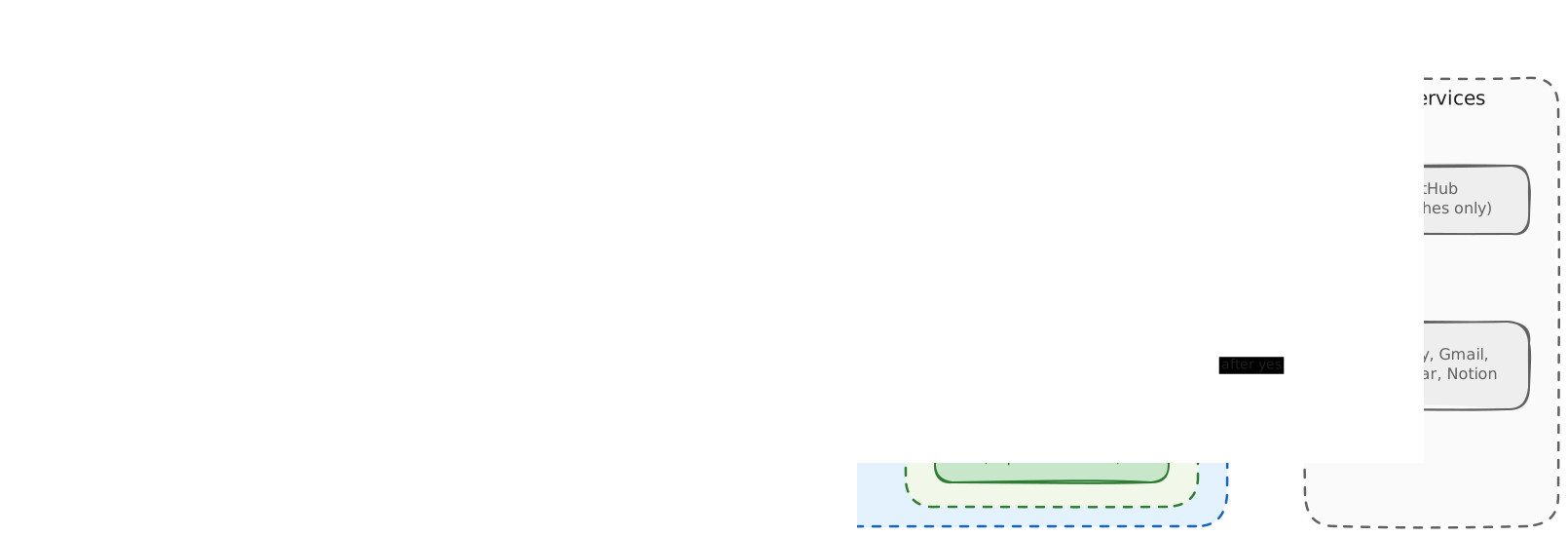
Tap the diagram to open it full size.
- 🟧 Left: the ways I get in.
- 🟦 Middle: the MacBook, where Pi and Claude Code do the work.
- 🟩 Shared: every agent, however it was started, goes through the same guard and uses the same memory, skills and MCP servers.
- ⬜ Right: the only outside services the agents touch, and each of those connections is gated.
🧱 The unglamorous foundations
Most of the first day went on things nobody would put in a demo.
| What | Why it matters | |
|---|---|---|
| 👤 | A separate, non-admin macOS user | Agents can’t see my browser sessions, Keychain, iCloud or SSH keys. If one goes off the rails, the damage stays in a sandbox I can wipe. |
| 🔒 | No open ports | Everything is reached over Tailscale. The one exception is a Cloudflare Tunnel for the docs site, and the Mac opens that connection outbound. Nothing on the internet can knock on the door. |
| ☕ | Keeping a closed laptop awake | macOS really wants to sleep with the lid shut. Staying awake on power, restarting after a power cut, and not cooking the battery took more fiddling than I’d like to admit. |
| 🔐 | The FileVault trade-off | After a reboot nothing runs until someone logs in. I wrote that down as a known limitation instead of pretending it away. |
None of this is interesting, and all of it decides whether the system is still running in a month.
🛡️ Guardrails are code, not prompts
One line in my “anti-goals” section shaped more of the build than anything else:
❌ Approval rules that exist only as instructions to the agent.
Telling a model “please don’t force-push” is a suggestion. I wanted rules it physically couldn’t break. So every shell command an agent runs goes through a guard that blocks the dangerous ones:
git push --force 🚫 · push to main 🚫 · delete remote branch 🚫 · publish package 🚫 · deploy 🚫
The guard shipped on day one. By that evening I’d already found and closed several ways around it.
🔍 The day-one bypasses
- Commands hidden after a newline
- Commands piped through
xargs - Commands built at runtime with
eval - Commands run by
find -exec - A handful of wrapper tricks
- And the fix that mattered most: the hook now fails closed. If anything inside it errors, the command is blocked, not allowed.
It was humbling, and it was the right lesson. Treat agent output the way you treat user input: untrusted until proven otherwise.
💬 None of these guardrails came from an incident, and I’d like to keep it that way. They were in the design doc before any agent ran a single command. Waiting for the first force-push to main before building the guard is the expensive way to learn.
🛒 The yes gate: groceries without surprises
The same idea shows up in the part of the setup I use most, the grocery order from the opening. I have a diet bot on Signal with access to Swiggy Instamart. I tell it what I need for the week, and it searches, builds the cart, and sends me the items, the total after coupons, the address, the payment method and the ETA.
It cannot check out on its own.
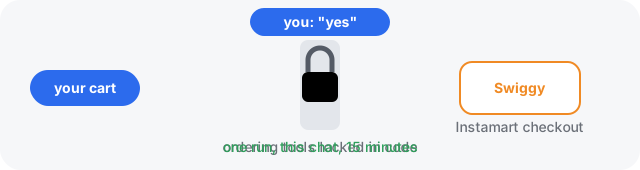
- 🔒 Ordering tools sit behind a gate in code, and the only thing that opens it is me replying “yes” in that chat.
- ⏳ That one word unlocks exactly one run, for fifteen minutes, and only for that bot.
- 🧾 The run places the cart I confirmed and nothing else. If the cart, the total or the address has changed, it asks again.
- 🙅 The model can’t say yes for me, and a yes in another chat doesn’t count.
Paying works in one of two ways:
| How it pays | What I do | |
|---|---|---|
| 🎁 Gift card balance | Fully automatic checkout from a preloaded Swiggy gift card. My “yes” is the last step | Nothing. I get the order ID and ETA |
| 📲 Pay by message | The bot sends me a UPI payment link or QR, and only calls the order placed once payment succeeds | One tap in my UPI app |
The gift card is quietly the best guardrail of the lot. It’s a prepaid spending limit, so even a confused agent can only spend what I’ve loaded onto it.
It isn’t paranoia. I just don’t want to come home to forty biryanis. 🍛
🧠 Memory you can actually read
Memory is plain Markdown on disk, managed by Basic Memory. Any agent, any model, or I myself with a text editor can read it.
| Level | What lives there | Who can change it |
|---|---|---|
| 🌍 Global | My preferences, injected into every session | Only me |
| 📁 Project | Discoveries, current state, tasks, decisions | Agents, but decisions wait for my review |
| 📝 Session | A handoff note at the end of every session: done, blocked, next | Agents, freely |
Routine notes save themselves. Decisions don’t. An agent can propose that we change how backups work, but it can’t quietly decide it.
The handoff notes turned out to be the best part. Pi starts something, Claude Code picks it up the next morning, and neither needs to know the other exists. 🤝
📲 Reaching it from anywhere
| Door | What it is | When I use it |
|---|---|---|
| 💻 Terminal | SSH into persistent Herdr panes running Pi or Claude Code | At a laptop, for real coding |
| 💬 Happier | Happier, a chat app for coding agents, with its relay self-hosted on the Mac. I start, watch and answer sessions from my phone, and no traffic goes through anyone else’s server | On the move, steering a session |
| 📄 Docs | Agents save plans and reports to a private docs site on my own domain and send me a link, with comments | Reading anything longer than a text |
| 🔵 Signal | Small phone bots fronted by Hermes Agent, one group chat per agent | Everyday asks, my Grok-style front door |
Why Signal? I started out designing around iMessage, compared the options, and picked Signal. iMessage couldn’t give five or ten agents their own threads, while Signal gives each one its own group from a single bot number.
Replies have a hard 600-character limit, and anything longer becomes a doc link. That limit made the bots far more pleasant to use than any amount of “please be concise” in a prompt.
There’s also a shared browser 🚦: a containerised Chromium the agents drive. When a site throws up a captcha, the bot pings me on Signal with a screenshot, and I solve it from my phone through a noVNC tab before the agent carries on.
✨ Creating a new agent, end to end
This is the Grok-like part, and it’s the flow I’m happiest with. Making a new agent takes about a minute and never leaves my phone.

- ➕ Create a Signal group with just me and the bot. A small job accepts invites only to groups I created and ignores everyone else’s.
- 🗣️ Say what the agent is for, in plain words: “You’re my diet manager. Plan my groceries and order from Instamart when I ask.”
- 📜 The bot proposes a charter: a name, a short purpose, and a permission level from a fixed list.
- ✅ I reply “yes”. Only then is the charter saved. A gateway hook commits it when my next message is a plain yes. The model has no way to save a charter itself.
- 🎉 The agent now exists. Every message in that group runs as that agent.
🎚️ The permission levels a charter can pick from
| Level | Workspace | Can do |
|---|---|---|
assistant |
general workspace | Answers from my notes and docs, and remembers what I ask. No web |
research |
general workspace | Web research, returned as a short report with a docs link |
coder |
one lab project | Changes code on a branch, runs the tests, pushes the branch. Never merges |
status |
the homelab, read-only | Job results, service health, disk and recent errors. Changes nothing |
digest |
general workspace | Read-only summaries of what changed and what’s pending |
food |
general workspace | Swiggy food, groceries and bookings, with ordering behind the yes gate |
There are no free-form tool lists. A charter picks one level, and that’s it.
⌨️ Chat commands
| Command | Does |
|---|---|
/charter |
Shows what this agent is and what it may do |
/new |
Starts a fresh session |
| describe a change | Proposes a new charter, which needs another yes |
🔄 What happens when I send that agent a message
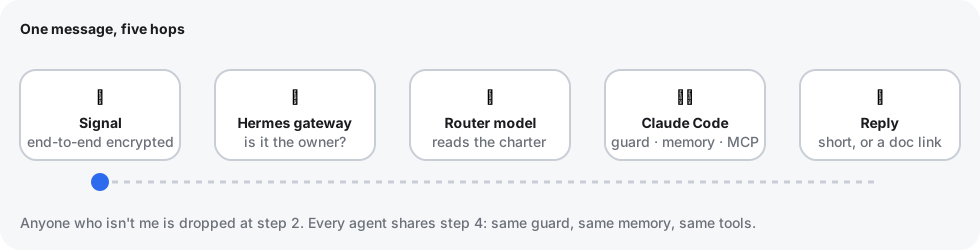
- 📱 Signal delivers it, end-to-end encrypted, to a bot number running on the Mac.
- 🚪 The Hermes gateway checks that the sender is me and drops anything from anyone else.
- 🧭 A cheap, fast router model reads the chat’s charter and either answers directly or decides real work is needed.
- 🛠️ Claude Code (
claude -p) does the real work in the agent’s workspace, with the tools its level allows. The guard, memory and MCP servers apply exactly as they do in a terminal session. - 💬 The reply comes back short. Anything over 600 characters becomes a document, and I get a link.
🧩 Every agent is a charter on top of the same harness, memory and tools. Ten agents don’t mean ten stacks. They mean ten group chats.
🗓️ A week with my agents
Each of these is just a Signal group with a charter. Same harness, same memory, same tools underneath.
🛒 The grocery bot · food
The one from the opening. Once a week it plans groceries around what I eat, fills the Instamart cart and asks “Place it?”. One “yes” later it’s ordered, paid from the gift card or through a UPI link, and tracked.
☀️ The morning digest · digest
I set this one up with a single message in its chat: “Every morning at 8, brief me.” Scheduled jobs can be created straight from Signal, so that was the whole setup. Every morning it sends one short message:
☀️ Good morning. 3 things need you today.
- ✅ Todos and reminders due today, from my calendar and notes
- 📧 Mail worth reading, summarised in one line each, with the noise left out
- 🤖 Overnight agent work: what finished, which branches are waiting for me to merge, which decisions are waiting for review
Full digest: a docs link
It’s the first thing I read every day.
🩺 The health watcher · status
Running agents 24/7 means something is always quietly failing somewhere. This bot is read-only by design. It can look at everything and change nothing. It checks the background services, the Signal gateway logs, disk space and recent job failures every 15 minutes:
| When | What I get |
|---|---|
| 🟢 All good | Silence. No news is good news |
| 🔴 Something broke | A ping that leads with the problem and when it happened |
| 💬 I ask “how are my agents?” | A short health report, or just “all fine” |
The hardest part to get right wasn’t spotting errors. It was ignoring old ones. Log files that never rotate are full of history, and the first version kept reporting crashes from days ago as fresh news. It now only reports errors with a recent timestamp and treats everything older as resolved.
💡 Three bots, three permission levels, one stack. The grocery bot can spend (after a yes), the digest bot can read, and the health watcher can only look.
🔁 The surprise: it improves itself
What I didn’t expect was how much of the homelab the homelab would build. The setup is a git repo, and that repo is just another project the agents can work in.
📱 me: "add a Notion MCP server"
│
▼
🤖 agent: writes a spec → changes code + tests → updates the runbook → pushes a branch
│
▼
🧑💻 me, over SSH: read the diff → merge → re-run bootstrap ← the one step agents can't takeThe only step it can’t take is the last one, and that’s on purpose. Merging and deploying are mine. At first that felt like the one blocker in an otherwise hands-off loop. Now I think it’s the most important part of it.
🔑 The system can propose any change to itself, but only I can make one live.
(This post was drafted in that same project, by the way. 👋)
🎓 What I’d tell another engineer
1. 🌱 Scope creep is real, and it’s fun, and you should notice it. The plan was “remote access to my agents.” Four days and ~150 commits later it also has phone bots, a docs site with sharing invites, diagram tools and food ordering. Each piece is something else to keep running.
2. 📒 Write the runbook as you go. Every host step, every “you have to click this in System Settings”, every weird DNS fix (yes, there was one, and yes, it was DNS) went into the runbook the moment I hit it. Future me has already thanked past me twice.
3. 📌 Pin everything. Every tool version is pinned, and upgrades are a deliberate change with a review. An agent homelab that updates itself overnight is a great way to lose a weekend.
4. 🙋 Keep the human in the loop for anything you can’t undo. Agents commit and push branches freely. Merging, deploying, publishing and spending money still go through me. That line has never felt like friction. It feels like the reason I can trust the rest.
🌿 It’s a garden, not a product
It isn’t finished, and I don’t think it will be. Every week there’s something to prune and something new I want to plant. But the core idea has held up:
- 🖥️ The MacBook on the shelf does the work.
- 🧠 The memory outlives whichever model is fashionable this month.
- ✋ And I stay the one who says yes.
And once a week it asks me one question while I’m waiting for coffee: “Place it?” 🛒☕ I’m fine with that.
- homelab
- ai-agents
- claude-code
- mcp
- signal